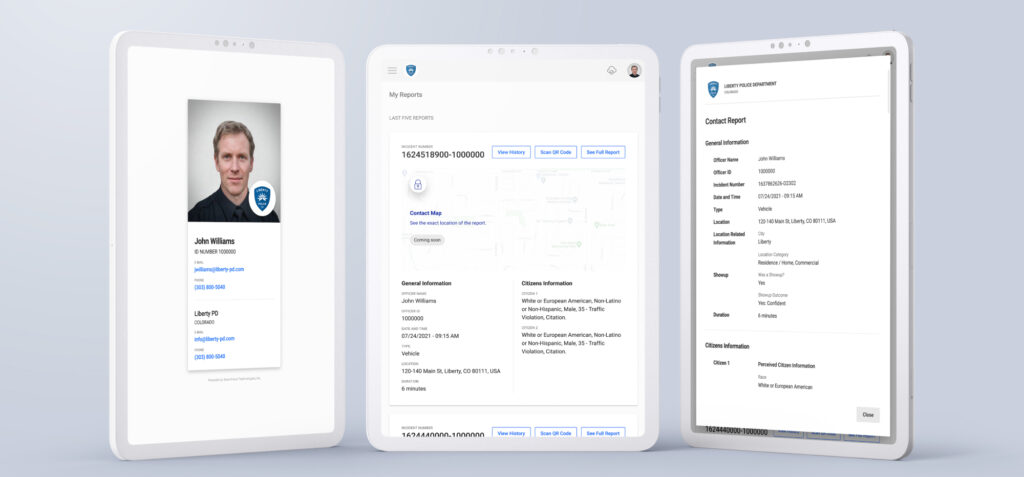
As the Colorado DCJ prepares to release final contact and use of force reporting data requirements, the team at CitizenContact by SmartForce® has been working on the latest release.
CitizenContact v1.6 has a couple of significant improvements that will save Officers time when reporting a contact. The notable improvements are:
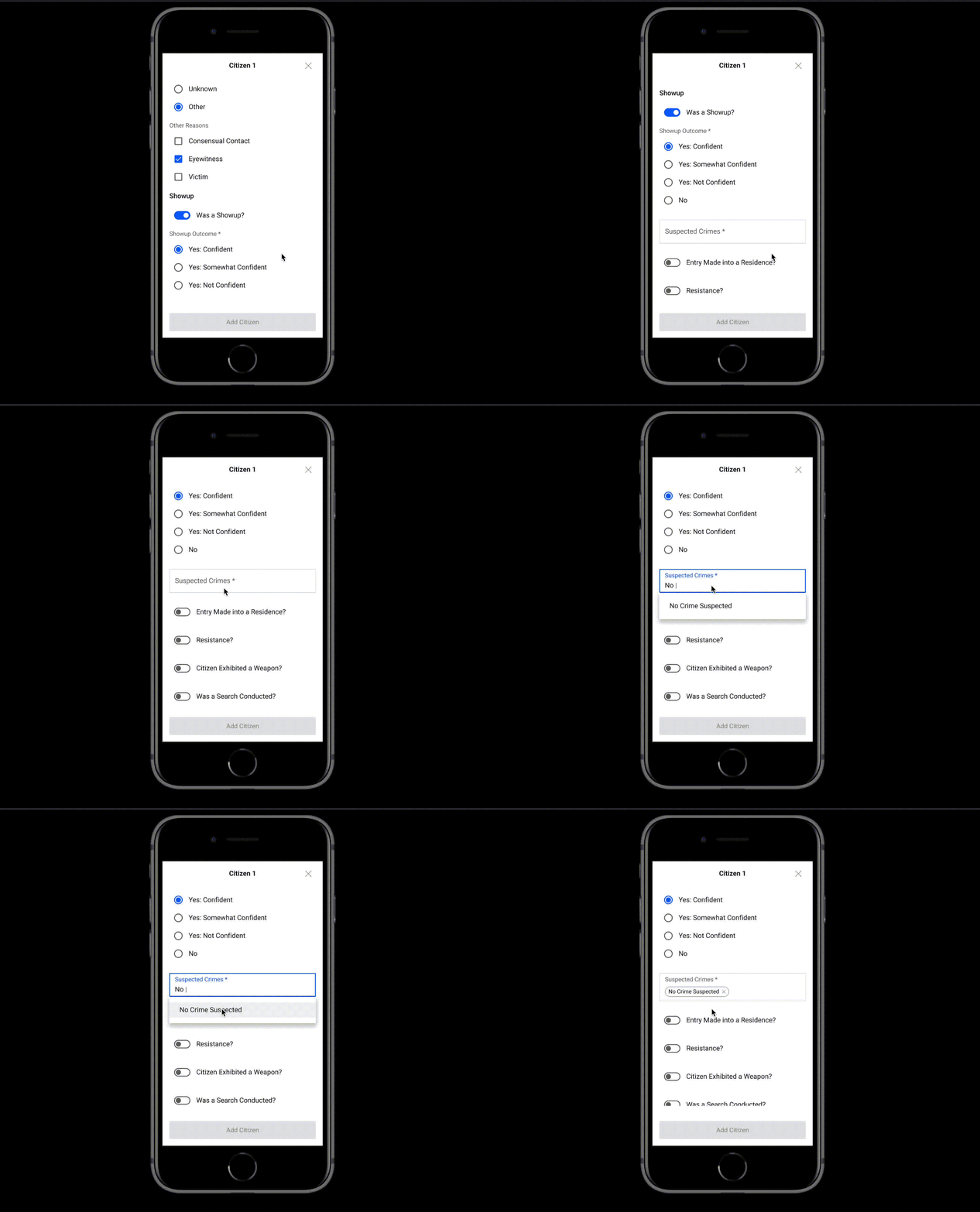
Auto Complete List Choices
Auto complete allows the user to begin typing the list choice they are looking for (eg. Assault). Auto complete searches by content, so as the user starts to type “Assault”, CitizenContact will identify all choices in the list that match the spelling, starting at the first three letters the user starts typing. List options that allow multi-select will still be allowed using autocomplete in v1.6.
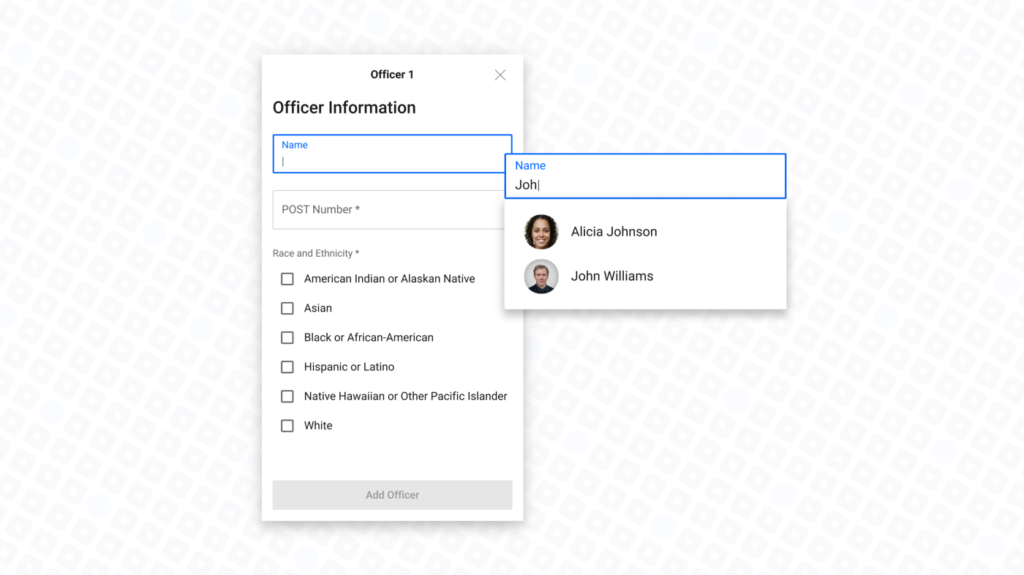
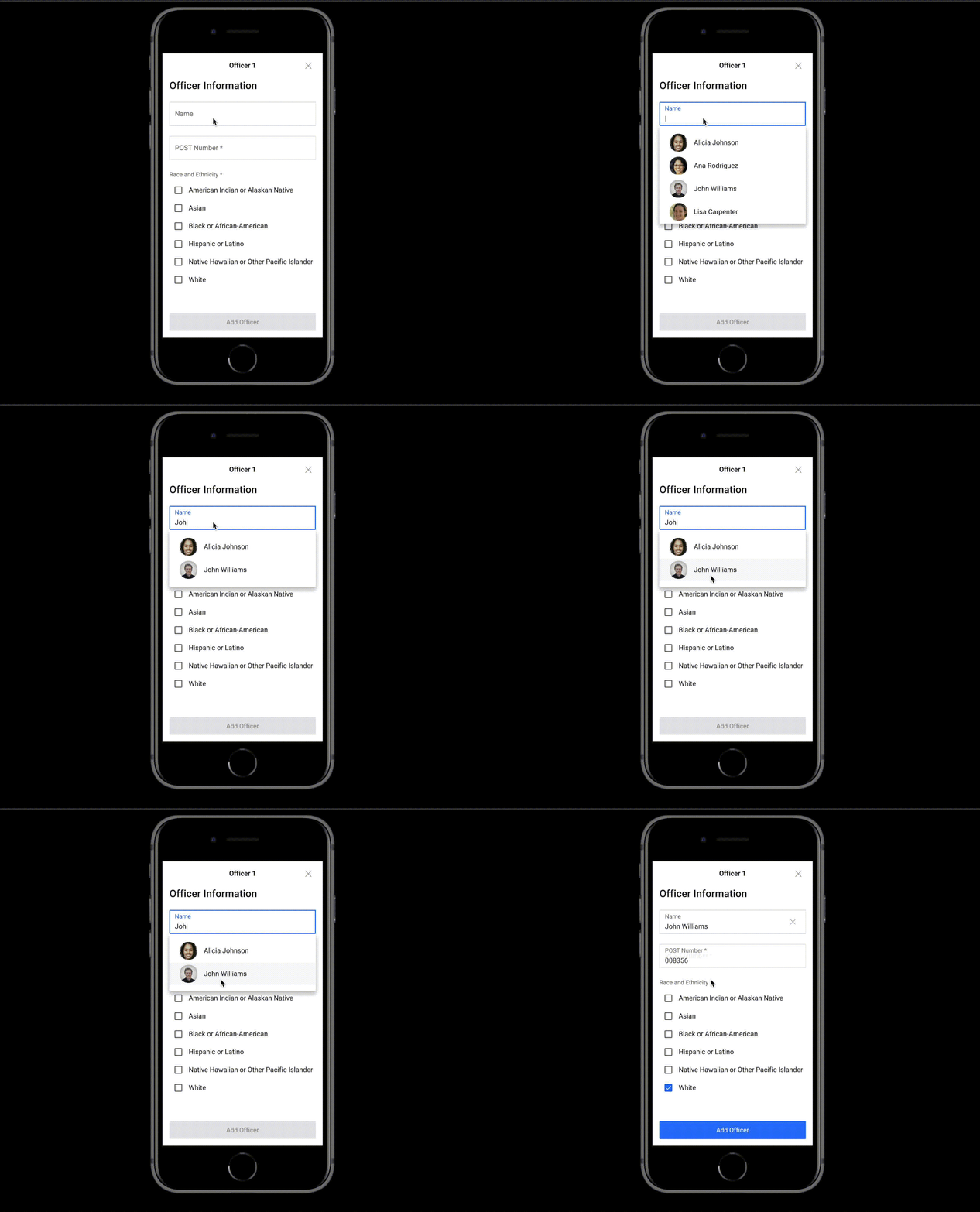
People Picker to choose officers involved in incidents and auto-population of Officer information
When adding an Officer to a use of force incident, start typing the name of the Officer. After the first 3 letters of the name are typed, a people picker will appear with the closest matches based on the first 3 letters that were typed. The People Picker only searches by name, not by email.
As the user/Officer continues to type the name of the officer being added to the incident, the name match in the People Picker will narrow the names to choose from.
Once the user picks the Officer from the People Picker, the name, POST number, race and ethnicity, gender, age, height, weight, years of service, and full or part-time employee indicators are auto-populated using the data from the Officer’s user profile in CitizenContact.
Thank you for everything you do to ensure the safety of your community.
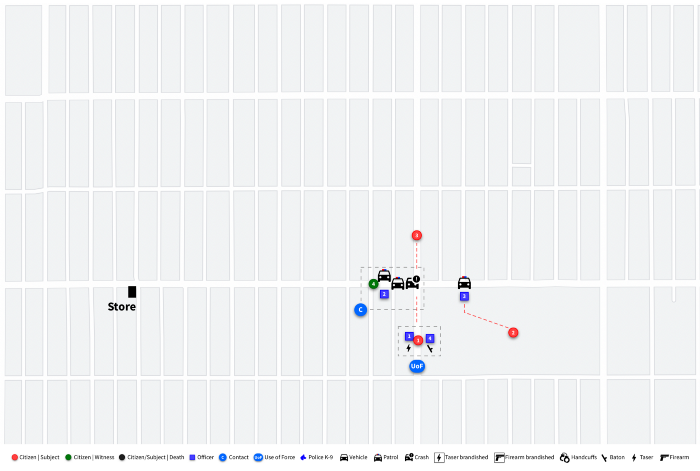
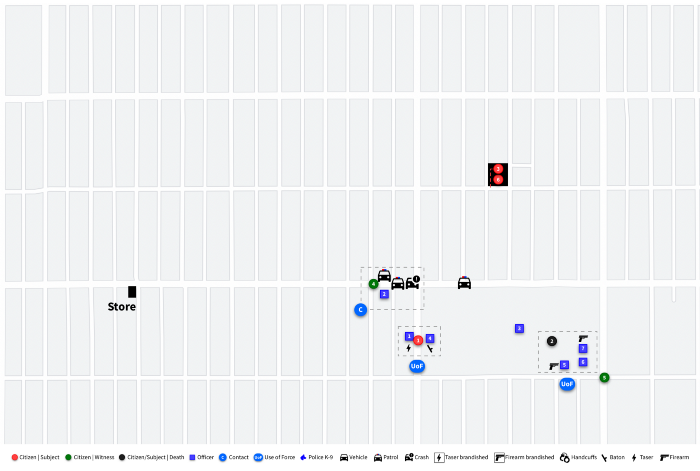
Have you ever been part of an incident involving multiple officers, multiple locations and multiple uses of force? While not frequent, it happens. Using a robbery as a scenario we share what you need to know from a data collection requirement (State and Federal), who reports it and how contacts and use of force are reported in CitizenContact.
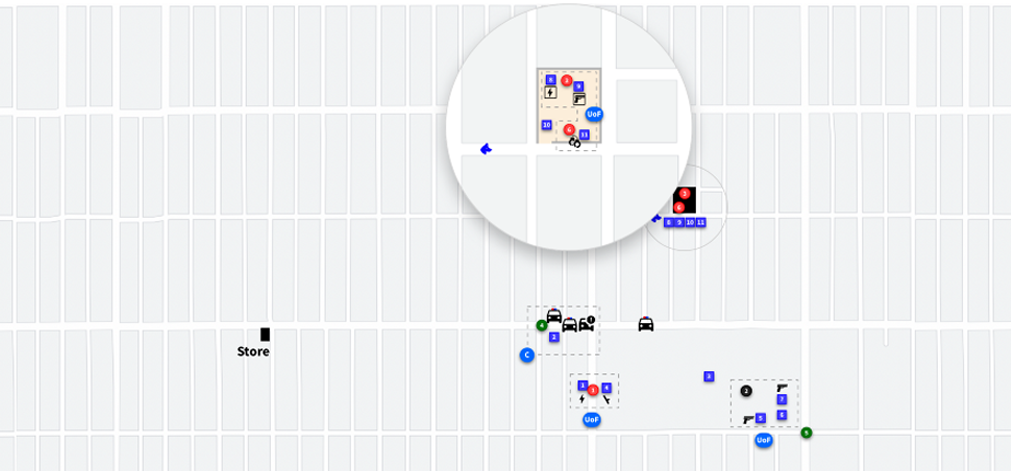
In the scenario below, Officers will be required to report the following:
Multiple contacts at four locations
Use of force at three locations
Unannounced entry at one location
A show-up (eyewitness identification) at two locations
Search and seizure of property at one location
Let’s dive into the robbery scenario.
One Officer at each location will complete the contact and use of force report for a total of four reports. Reports are completed in this manner based on the data structure published by Colorado DCJ and the detailed data structure required by FBI use of force reporting.
Scenario
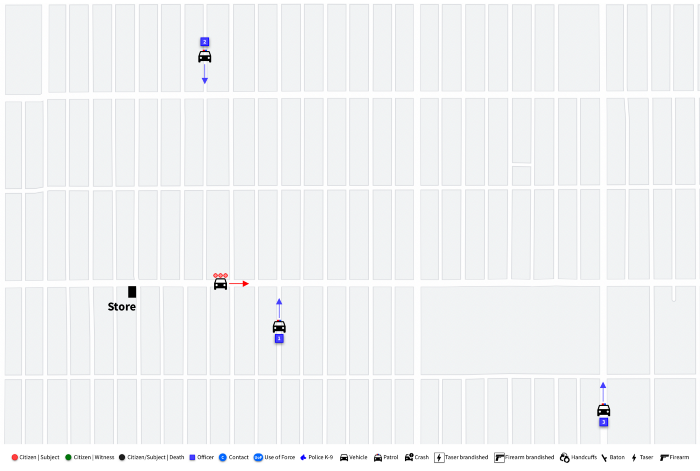
Officers respond to the report of a robbery at a convenience store.
Three Officers are dispatched to the convenience store. The two suspects fled the scene in a vehicle driven by a third suspect.
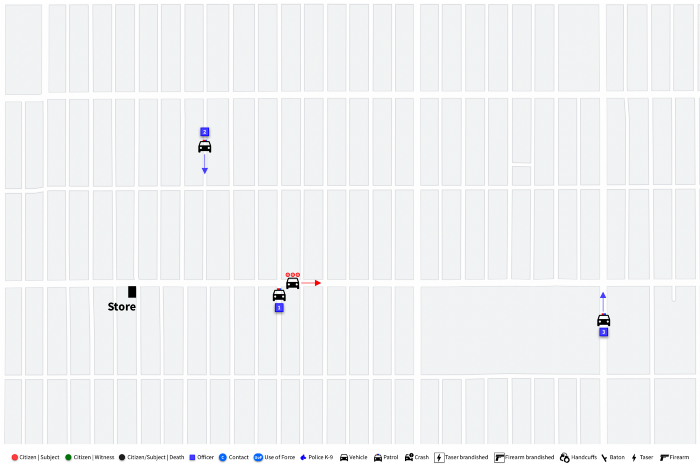
Officer 1 locates the suspect vehicle while en route to the call. Officer 2 responds to assist.
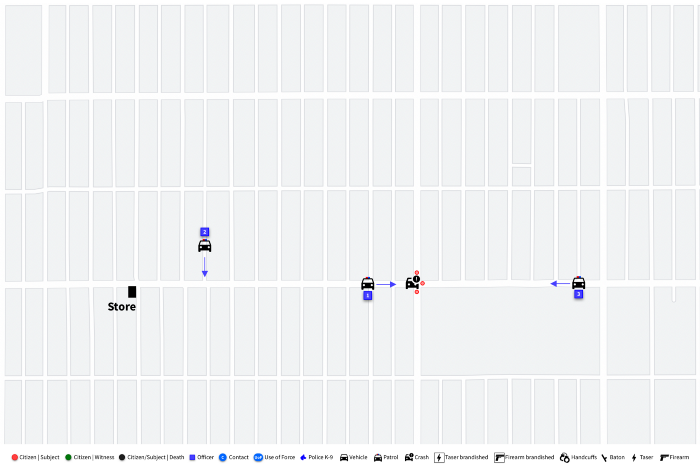
Officers 1 and 2 follow the Citizen’s vehicle, and the vehicle crashes.
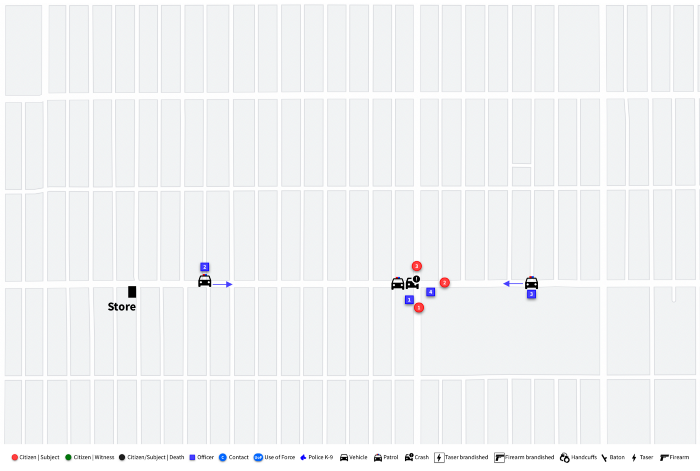
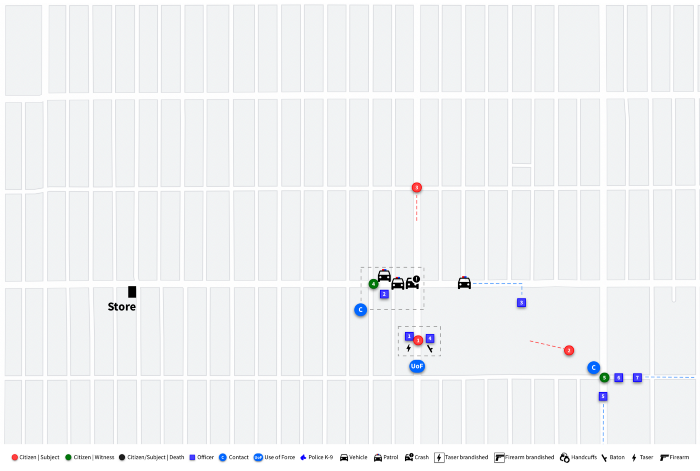
The three citizens run from the vehicle on foot in different directions. Officer 4 arrives at the vehicle crash.
Officer 1 and Officer 4 chase Citizen 1 on foot and catch him a few hundred yards away.
Officer 1 uses a taser.
Officer 4 uses a baton on the same citizen and arrests him.
Officer 4 reports the contact for Citizen 1, including use of force. In this instance, the data would be state reportable only. The data would not be FBI reportable because:
There was no serious physical injury or death
There was no discharge of a firearm at or in the direction of the citizen
Officer 2 waits with the crashed vehicle. He contacts a witness who can identify the three suspects.
Officer 2 reports contact with Citizen 4, which includes reporting of a show-up (eyewitness identification) as required by the State.
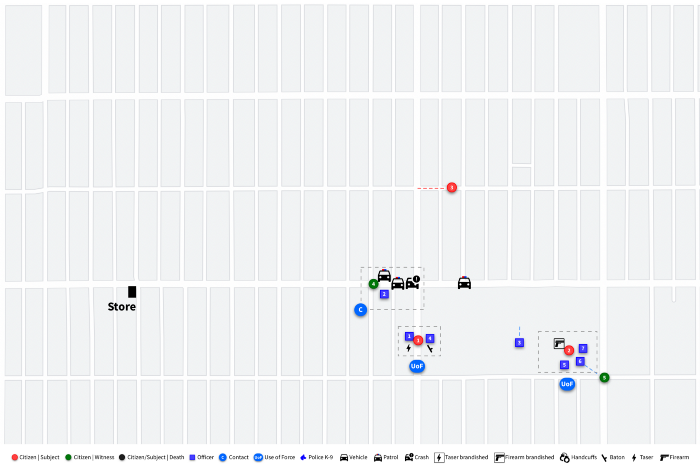
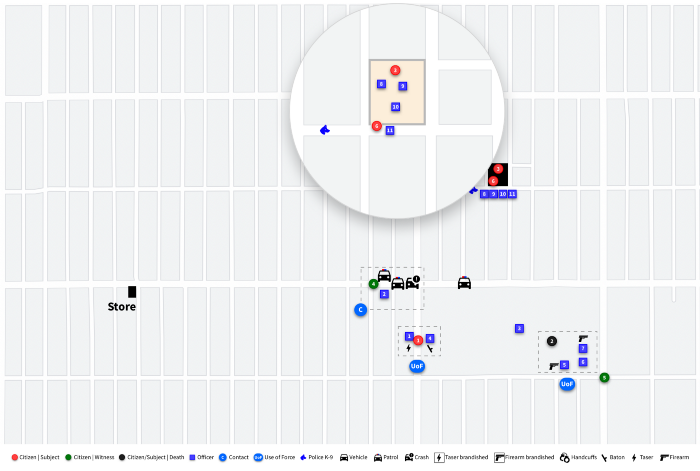
Citizen 2 runs to a local school and hides on campus. Citizen 5 calls the police when they see Citizen 2 run to the school and hide. Three Officers respond to the school and locate the citizen.
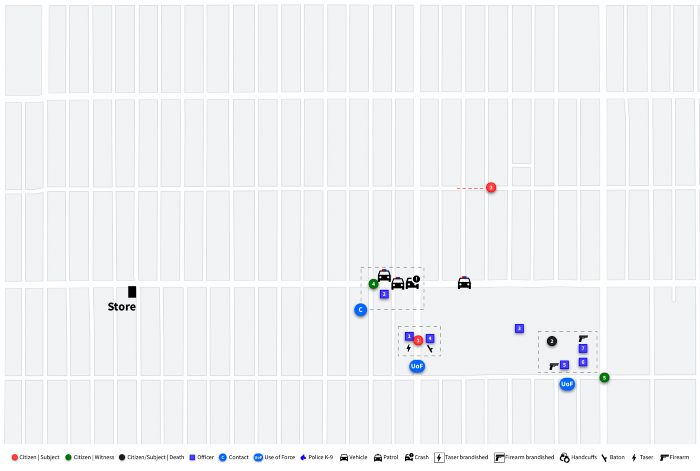
Citizen 2 brandishes a firearm at the three Officers.
Two Officers discharge their firearms at Citizen 2, who is now deceased.
Officer 6 reports contact with Citizen 5, including a show-up (eyewitness identification).
Officer 5 reports contact with Citizen 2, including the use of force report for this location. In this instance, the data would be state and FBI reportable.
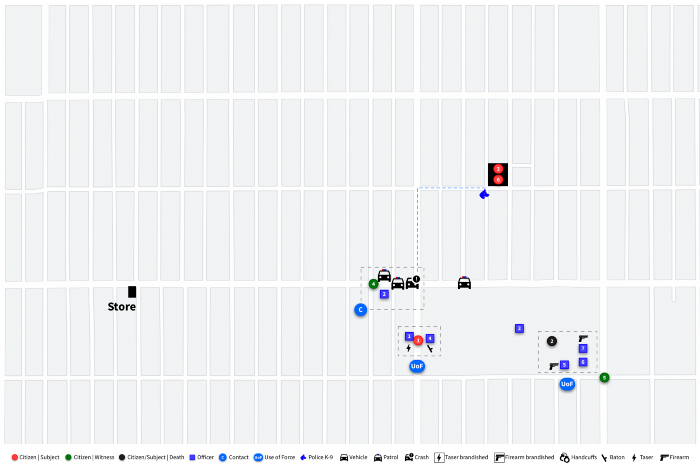
Citizen 3 runs to the home of Citizen 6. Citizen 6 hides Citizen 3 in the house.
Police K-9 tracks Citizen 3 to the house.
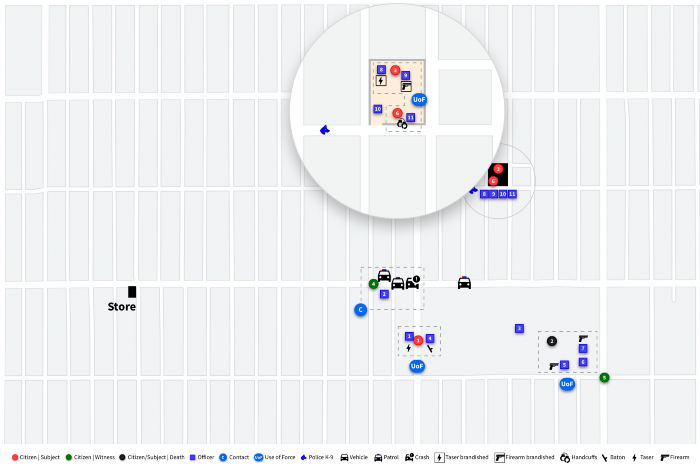
Citizen 6 allows the officers to search the house unannounced and they locate Citizen 3.
Two officers use force and arrest Citizen 3. Citizen 6 is arrested for Obstructing.
Officer 11 reports contact with Citizen 6 and Citizen 3, including the use of force report for this location. In this instance, the use of force would be state reportable only.
CitizenContact meets mandatory reporting requirements for the State of Colorado and FBI use of force. Utilizing a complex scenario sets the stage for how the report is completed and by who.
The deadline for law enforcement agencies in Colorado to collect and submit required contact, use of force, and complaint data, is April 1, 2022.
The framework for what data should be collected is laid out under Colorado SB 217, HB1250, HB 1142, and FBI use of force reporting requirements
Data elements provided by the Colorado Department of Criminal Justice were compared to the detailed use of force data collection requirements provided by the FBI.
As a result, we created a JSON data dictionary and export example for your agency to reference HERE.
SmartForce®, headquartered in Colorado, is offering its latest application, CitizenContact to Colorado law enforcement organizations to meet regulatory compliance related to SB 217, HB 1250, HB 1142, and FBI use of force reporting.
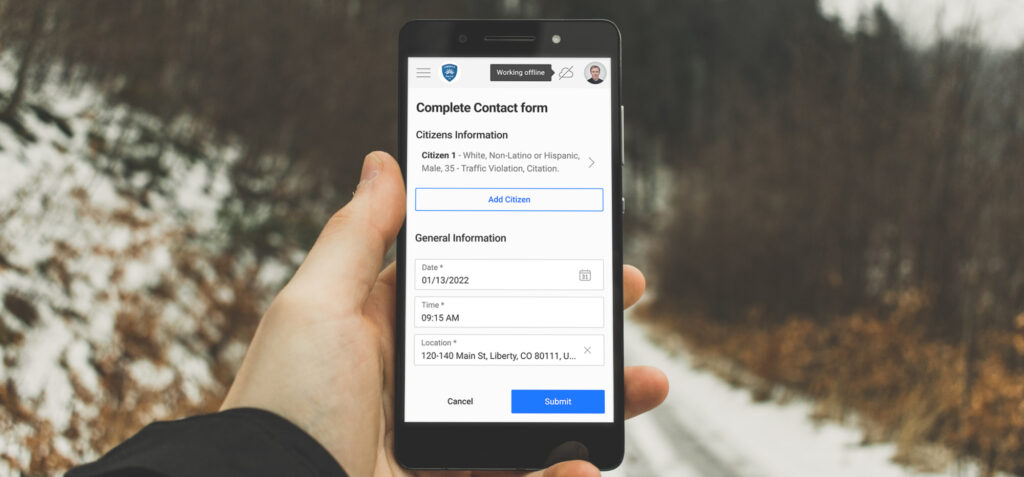
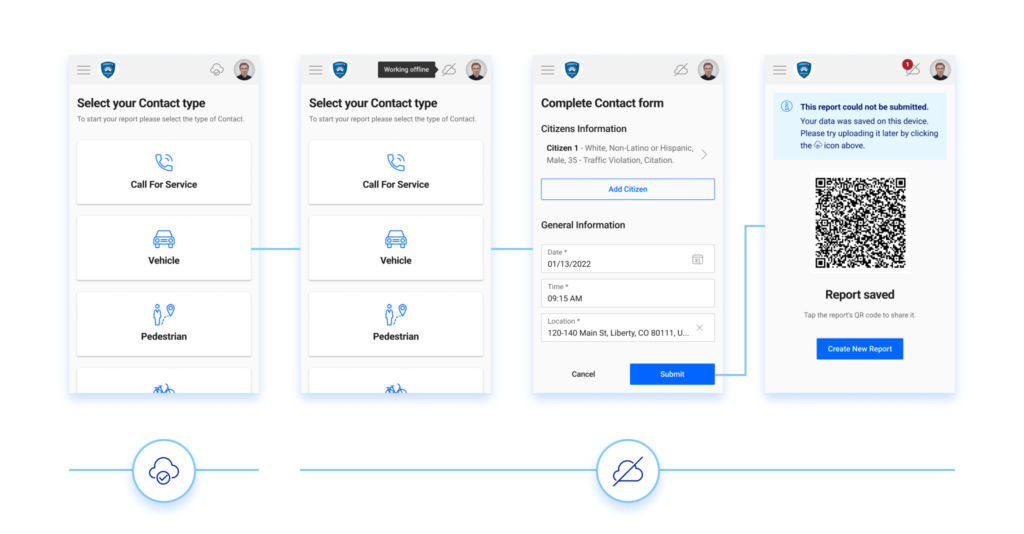
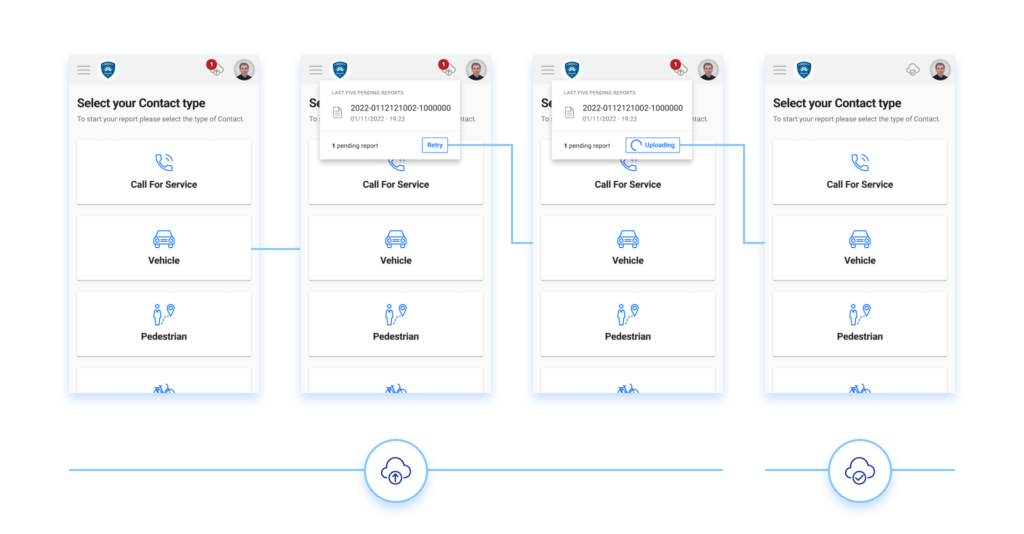
You start working, log in to CitizenContact, keep up with your squad, and start your shift. Later you stop a vehicle but your device is offline. You told us about this problem and we addressed it. That’s why we developed Offline Reporting. Now, even with no internet connection, the app starts working offline. So, all the contact reports will be saved locally. After your connection is restored, you can submit them.
Law enforcement organizations manage change
and comply with new laws all the time and it’s not always easy. In Colorado,
Senate Bill 217 requires all agencies to report citizen contact collections
originally slated to be in effect in January of 2023. A more recent bill, House
Bill 1250 from the last legislature moves that deadline to April of 2022. That
means local jurisdictions have about 3 months to be ready for full compliance,
8 months sooner than originally expected. To support local law enforcement,
SmartForce® built a brand-new tool called CitizenContact for the specific
purpose of collecting contact data and submitting it in the required format to
the state. If you are a Colorado Chief or Law Enforcement leader, here are 3
reasons CitizenContact is right for your agency:
We’ve taken the guesswork out
of compliance for you.
It’s FREE!
It’s a tool that simplifies
data transparency and helps build community trust.
It’s
FREE! Law Enforcement Officers are constantly doing
more with less – meeting new mandates with no new resources. Regardless of the
size of your agency, chances are you don’t have enough resources to quickly
bring your whole department in line with all the requirements the way you would
want. That is why we are offering CitizenContact for free. You have plenty of
updating to do, let this advanced tool be the easy decision for contact data
collection. We believe every agency should have access to the best technology
that helps them fight crime and become more data-driven.
It’s
a tool that simplifies data transparency and helps build community trust. With so many details to worry about and managing organization-wide
change, it is not always easy to see how this change can serve your agency.
Data can be a powerful tool to communicate about policing with the public, as
well as combating crime. After all, submitting the new contact data in a
specific way and format to the state really is about being able to see the
picture of what is happening on the ground with officers. Those pictures
include how hard officers work and the community members they help.
When SB 217 was originally passed, we along with you thought we had until January of 2023 to figure out new solutions to the mandates. Then, HB 1250 moved that timeline up and our deadline moved up along with yours. I’m quite proud of how agile our team was in responding to this new timeline and got the application ready and tested by local jurisdictions. The team has had to monitor changes in laws through the development process and will continue to do so. The more Colorado agencies we have using CitizenContact, the more we believe the state will be ready to meet not only the requirements, but also the call for more transparency and public trust.
The CitizenContact application has already
been piloted in dozens of Colorado Law Enforcement agencies. Chief Jack Cauley
of Castle Rock Police Department endorses it for his neighboring jurisdictions
because it is “very easy to use and streamline[s] citizen collection per Senate
Bill 217.” This kind of close collaboration with local jurisdictions is what
our team thrives on. We believe our software products like CitizenContact have
a vital role to play in the larger context of ethical policing that engages the
community as partners. These are the larger conversations that SmartForce wants
to be engaged in with you in the coming weeks.
For now, we know CitizenContact is saving
jurisdictions time and we are curious to learn exactly how much time. Have you
tried using another method in your agency to collect contact data? How much
time and what challenges have you run into? What other functionalities are you
wishing you had? We have already gotten requests for use of advanced use of force
tracking, complaints management and more. We always want to learn about what’s
going on in your agency, so we can better meet your needs.
To get started with CitizenContact please
contact us at [email protected]
We are excited to present a major upgrade for Reporting.
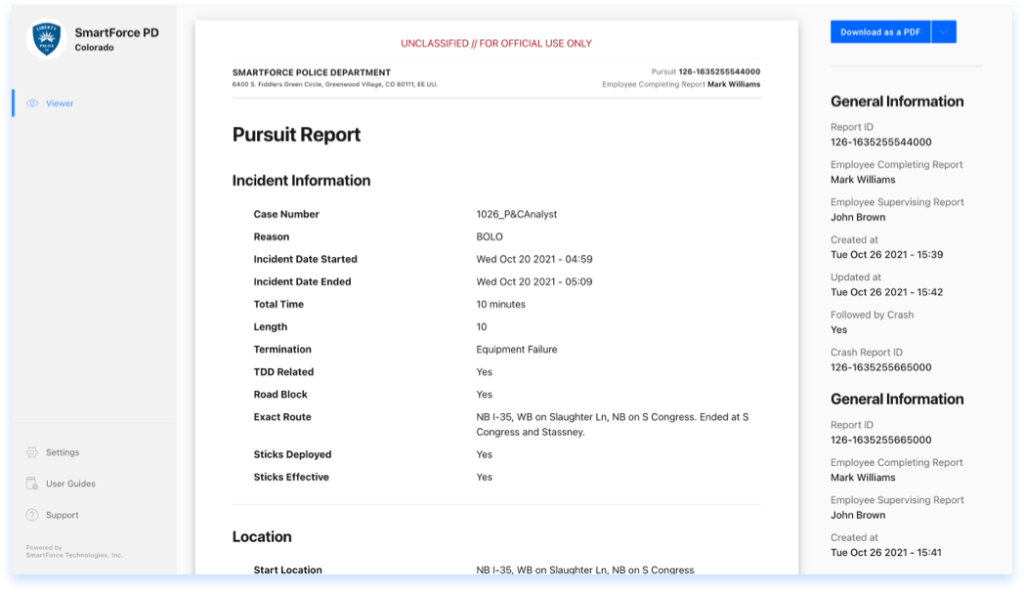
In this release, we included Complaints, Commendations, Pursuits, and Crashes. You will be able to filter your complete reports and view them in a unified way with Viewer.
Viewer by Smartforce® is the result of months of work. It makes it easy to view and print reports. For now, is connected to Reporting but we are just getting started.
Furthermore, we included a lot of enhancements and performance improvements to our apps to make your hard work easier.
What does your agency do to ensure optimal and timely communication between patrol shifts and across operational units? Is this communication done in a consistent manner? Is it available to all who need it 24 hours a day…seven days a week? Is it searchable?
The unpredictable nature of police work presents a great challenge in adhering to consistent shift briefings, squad meetings and other methods used by law enforcement officials to pass along information and collaborate on crime problems in a productive manner. Yet, the immediate and efficient sharing of information directly correlates to solving cases and producing positive crime fighting results.
SmartForce® Shift Briefing
SmartForce® Operations Discussions
SmartForce® Shift Briefing allows officers to share important case information, requests for follow-up, and shift summaries across all other squads/shifts and throughout the chain of command, in a format that is more reliable than email, running documents or logs, verbal exchanges, text messages or sticky notes left on the briefing room desk. We developed our Shift Briefing application after consulting with our law enforcement partners and current customers. The result is an application that will dramatically improve the way your agency shares information between shifts that is fast, user friendly and easy to access.
Shift Briefing Scenario
Dayshift officers responded to a domestic violence call at a residence. Upon arrival, the victim reported she had been assaulted by her live-in boyfriend who had fled the scene prior to police arrival. The victim sustained significant injuries and was transported to a local hospital for treatment. The victim told responding officers the suspect usually carries a handgun, and he may have a warrant for an unrelated assault charge. The responding dayshift officers developed probable cause to arrest the suspect for Assault-DV, but they were unable to locate him before the end of their shift.
Nightshift officers later received a call in the same area after a neighbor reported seeing a male and female arguing in the street outside the residence. Unfortunately, without the SmartForce® Shift Briefing application, the responding nightshift officers would likely have no idea that this incident may involve an armed suspect who was wanted for a domestic violence charge. Often times officers deal with situations like this where there is not enough time to file formal changes in order for a warrant to be issued and entered into NCIC, or information is not successfully passed along to other shifts either verbally or via email, CAD, or RMS. If this department had the SmartForce® Shift Briefing application, the nightshift officers would have known about the earlier incident in the same neighborhood and would have been aware of the possibility that this second call was related. They could have been better prepared knowing an armed suspect was likely present, and they would have been able to continue the original investigation efficiently with the information provided by the dayshift officers in the Shift Briefing application. Shift Briefing allows the intelligence to be passed along and accessed according to itsimportance and relevance, not by who is sending or receiving it. The information is available 24/7 and accessible to all officers regardless of their work schedule or assigned area.
SmartForce® Operations Discussions not only provides a platform where the whole team has access to incident information, crime trends and other policing projects, but they can also contribute in real time without the disorganized threads of emails and multiple versions of bulletins. Similar to Shift Briefing, the biggest value Operations Discussions offers is organizing all information by the operation or project you are working on, not by email, bulletins, text messages or other disorganized means. It allows everyone within the department, from Patrol and Crime Analysis to Traffic and Investigations, to all work together without having to constantly schedule physical or virtual meetings. Plus, they can share all types of information from documents and links to photos and video clips all within this one application.
Operations Discussions Scenario
Here is a success story from one of our mid-sized city police department customers who used Operations Discussions to manage a large-scale policing project. Their officers and crime analysts noticed a significant increase in calls for service for a variety of offenses surrounding a specific residence. The project spanned 3 months and involved 35 team members from Patrol, Special Investigations/Narcotics, Property Crimes, and Code Compliance. A project of that scale needed an organized strategy and most importantly, the utmost clear and effective routes of communication.
The project resulted in multiple drug and warrant arrests, a resident who was being taken advantage of was able to receive the mental health services he needed, and calls for service at the residence after the conclusion of the operation went down to near zero.
The operation produced 60 project log entries from all the team members. Due to the ease of access and visibility of the entries, it allowed everyone to be on the same page in terms of project objectives, plans and response data. There were no lags in communication or duplication of efforts. Emails and bulletins would not have allowed for direct, relevant responses immediately accessible to the whole team. With SmartForce® Operations Discussions, command staff and project managers can run reports on any given operation to extract important metrics such as time spent, contacts, arrests, citations, etc.
These vital operational communication tools allow for the free flow of all types of information between shifts, units, and all levels of command. When you get your teams to start using Shift Briefing and Operations Discussions, you will immediately see increasedvalue and productivity duringin-person communications because these operational communication tools will have done the hard work of organizing the information beforehand.
As with all our products, these applications are CJIS compliant and allow departments to manage complex information in an organized and easy to use fashion. With these two crucial Operational Communication tools, you always have a 360-degree view of all important agency information. In turn, your officers’ situational awareness will dramatically increase, and your communities will immediately benefit from more efficient and better-informed law enforcement professionals on their side!
Chris Arvayo Head of Government Compliance Initiatives
Having a reliable, cutting-edge early intervention system allows a police agency to effectively monitor the risk and wellness of their police officers, impacting the safety of the community they serve and protect.
An effective police leader knows that having a clear picture of an employee’s performance can prevent problems from arising and allows quick responses to address the problems when they do arise.
Introducing the SmartForce Early Intervention System. A cutting-edge tool that provides law enforcement leaders a real-time look at an officer’s risk, allowing for timely intervention when it is needed.
The Early Intervention System has an intuitive user interface that allows Command Staff to set the risk and intervention tipping point related to complaints, crashes, pursuits, and response to resistance reports generated in our SmartIA software.
The user interface alerts the user to the types of activity the officer is involved in as soon as the officer is added to one of the reports in SmartIA
Toggle between risk and timeline view.
Add intervention notes, and collaborate with other members of the command staff, to ensure risk is properly managed.
With the SmartForce Early Intervention System, manage risk, drive accountability, ensure officer wellness, and increase public trust. Thank you for your commitment to making your community safer.
We have developed a new way to use data to drive decisions on internal process improvement by searching reports in our newest version of SmartForce®. You can customize filters for the wanted output, export data to the most widely used data analytics format, and much, much more. Reporting is the name of this new application. It is a powerful and effective technology that can help your department understand its performance, improvements in training, and transparency, We look forward to this release and would like to share the excitement with you.
We listen carefully to all the feedback our clients suggest. For this reason, we also included a collection of stability improvements and suggested enhancements based on your observations.
We hope this article serves as a first look at what is coming.
Reporting
It’s more than a search engine, it’s a platform. It’s the foundation on which you can personalize and build the analysis you need for your Professional Standards reports.
For this first version, we started with Use of Force reports gathered from our Response to Resistance application. After the reports pass the Supervision levels, the personnel who is allowed to access The Reporting System will be able to filter their data deeply.
Filters
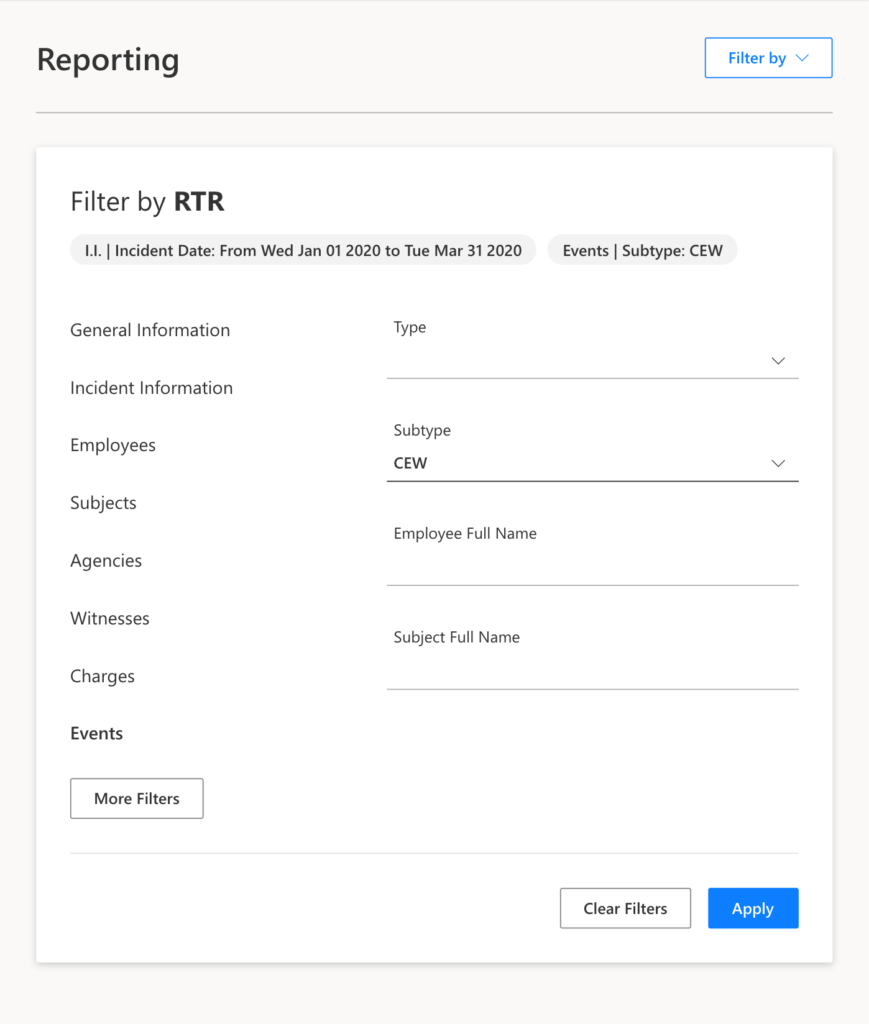
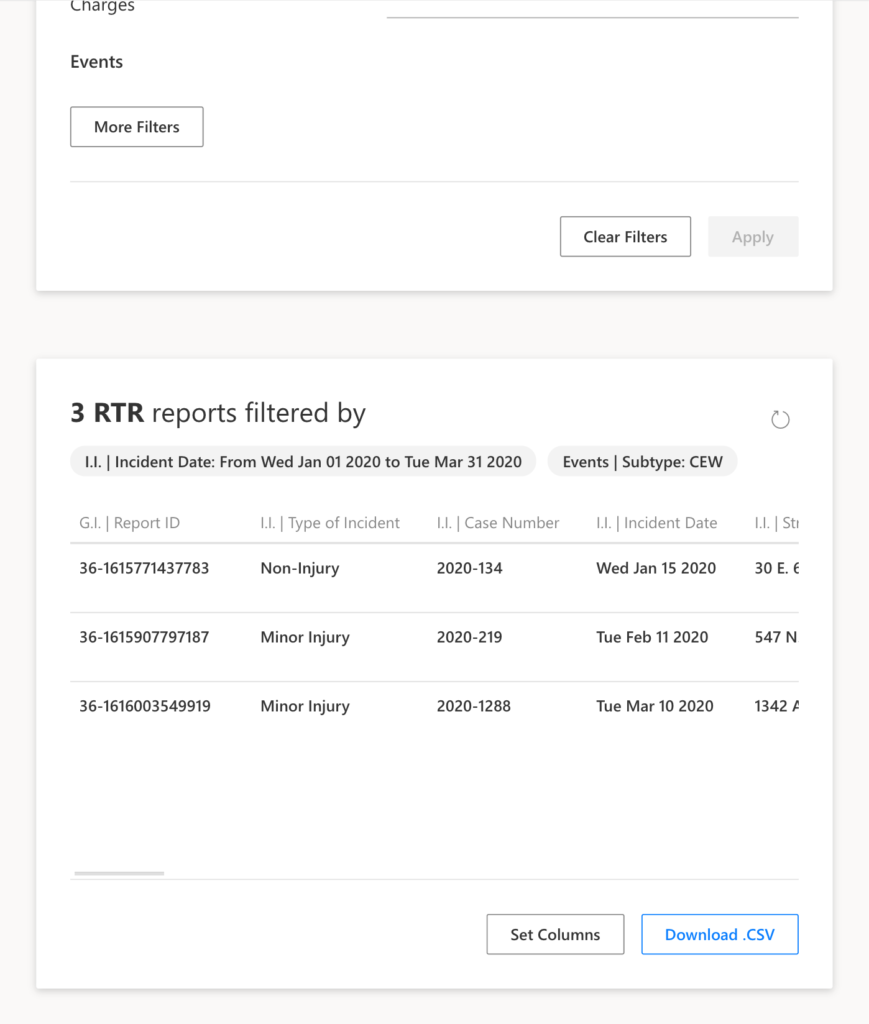
Once you choose the application you want to filter, a box will pop up. In this box, you will see the sections and fields of data to choose from. You can add up to 10 filters to do deep and custom searches. Once you apply your filters, the results return immediately.
Change Filters
Then, if you want to start from scratch, you can easily clear the filters.
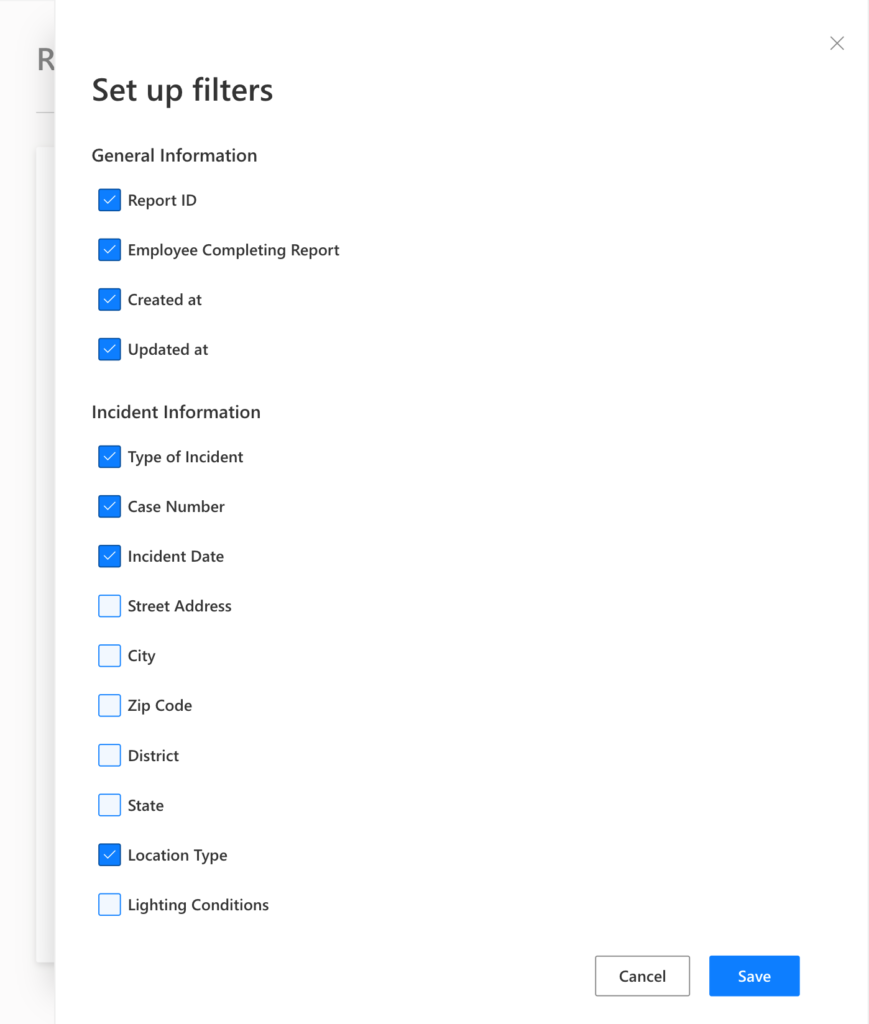
If you want to add or remove filters, you will see an option for “More Filters”. It opens a panel where you can choose the filters you want to add/remove. This configuration is personal and will be saved on your computer/device.
Output
Once you apply a combination of filters, you will see the results sorted by Incident Date.
If you want to expand or shrink the columns of the results table you will see the option to “Set Columns”. A panel opens where you can choose and save the columns you want to see and export. This configuration works in the same way the filter settings do. Each box, Filters, and Output work separately and each one has its own settings that will be saved locally.
Exporting Data
We want to help you build the custom reports you will need. For this reason, we provide the user with an export format that data analysis uses. If you use Excel, you will be able to easily import the file and then proceed with the process you are used to doing.
Access
Information security is our highest concern. Therefore, we add one more layer of security where only a select group of agency staff will be able to access this information.
Upcoming enhancements
Soon we will add Complaints, Commendations, Pursuits and Crashes to the Reporting search engine.
Also, we plan to work on charts.
Learn more
Please visit our resources page where we have posted educational videos. Also, you can visit our blog where we periodically post articles you might enjoy.

 The SmartForce® Team